Understand a change in your bill
Keep individual charges, such as a fixed fee and usage, alongside the total. Compare recurring components across billing periods to see which charge changed.
Open source · Self-hosted
Track recurring bills, due dates and payments. Add details yourself or through your integrations, and keep each month's breakdown for comparison.
The demo uses sample household data.
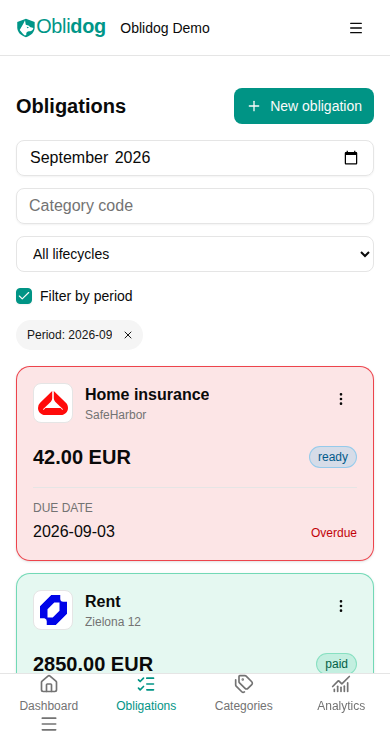
Track obligations before the final amount is known. Collect the details, confirm what is due, and mark it paid when you are done.
See obligations for future periods before data collection starts.
Add or correct amounts and dates manually or through an integration.
The amount and due date are confirmed. The obligation is ready to pay.
Payment is marked as complete, with the bill details kept for reference.
Already have complete details? Start at Ready. Reopen an obligation when details need correcting, or cancel it while collecting data. Integrations can flag inconsistent bill data for attention.
The calendar shows when bills are due. The forecast shows unpaid amounts by due date, separately for each currency.

Keep individual charges, such as a fixed fee and usage, alongside the total. Compare recurring components across billing periods to see which charge changed.
Mark a bill as paid or let a supported integration update its status. Amounts, components and action history stay available. Oblidog tracks payments; it does not send bank transfers.
Bring data from your own sources into the same bill workflow. Use the API directly, or start with the Python SDK and a working example.
Run integrations separately on your infrastructure, on your schedule. Each needs its own setup and data-source access. Manual entries work alongside imported data.
Self-hosted means the application and its database run on a machine you manage. The standalone setup uses Docker Compose and includes PostgreSQL.
Read the self-hosting guideFollow the guide to set up the containers, application secrets and access to your instance.
Create categories for bills such as rent, electricity and insurance, then review their billing periods and amounts.
Start with manual entries. Add an integration later to import data into a category.
Oblidog is open source and in active early development.